
Colorblind Palette Design for Eurorack Modules
accessibility · echoa · alchemy-sdk · ui-design
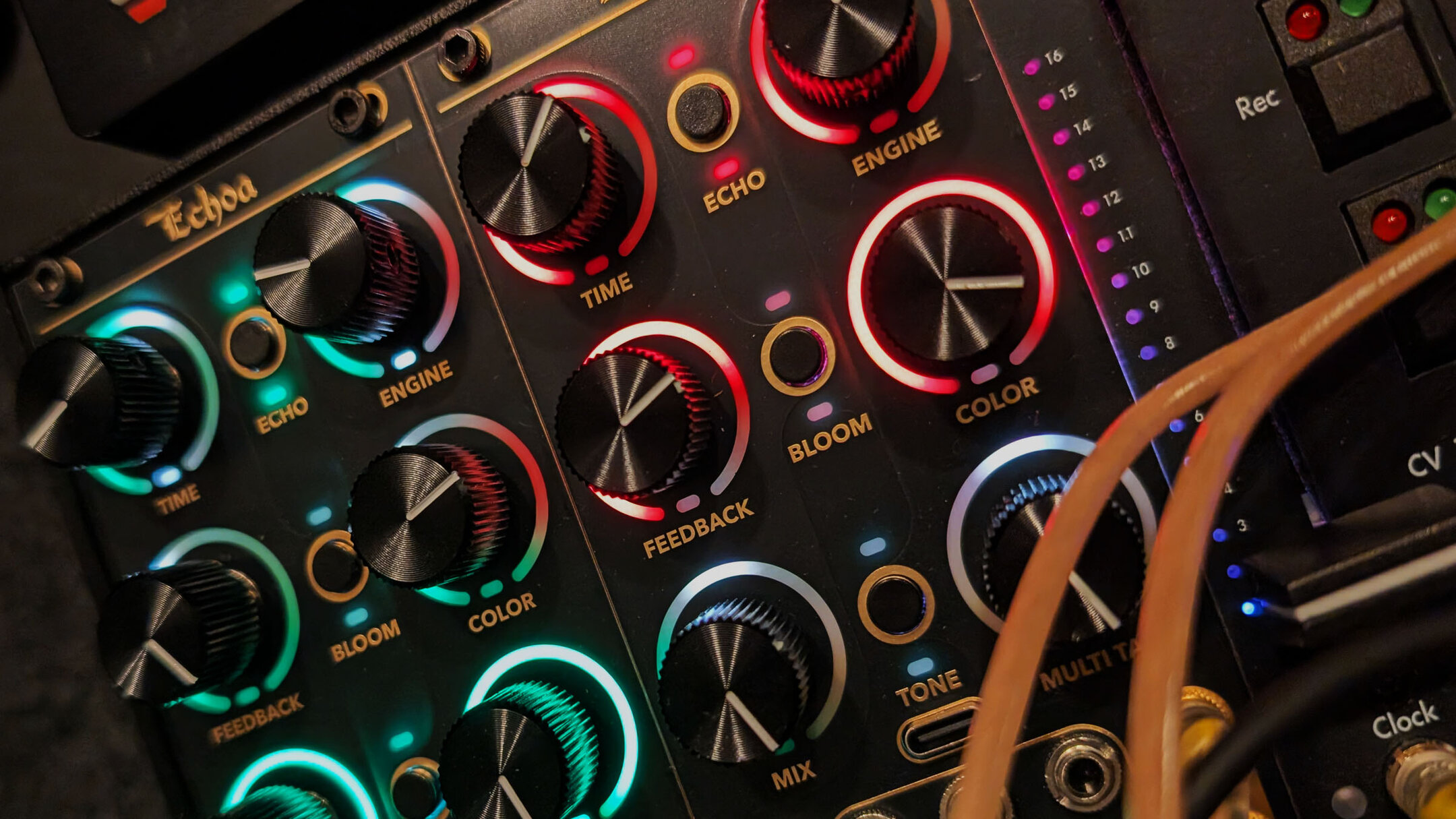
Roughly one in twelve men and one in two hundred women have red-green color vision deficiency, and the Alchemy Lab's entire user interface is 102 color LEDs. This is a serious accessibility problem that showed up literally the first day units arrived for my customers. So, I prioritized adding a colorblind-safe LED palette: every red versus green moves onto a blue, orange, and yellow axis with brightness separation, switchable live as an option and saved with presets. This post walks through what the stock scheme looks like to a red-green colorblind user, the remap pair by pair, and tips for the firmware structure for managing palettes.
All we've got is colors
Echoa has no screen. Or is all screen, depending on how you look at it. Its display is 102 WS2812-family RGB LEDs, sixteen around each of the six knobs plus two per button, all fed by one DMA-driven LED driver. On hardware with a screen, color coding is a convenience layered over text. Here color carries a large chunk of the vocabulary. Using Echoa as the example firmware:
- The three performance pages identify themselves by color. Ring fills and the page indicator render green on the Time page, red on Space, blue on Engine.
- The feedback knob has a snap zone at exactly 100 percent, marked with a green pip. Past it the delay line self-oscillates, and the pip turns red as the warning.
- The output VU that paints over the gain knobs in Settings runs the classic green, yellow, red.
- The bipolar damping ring fans out from noon: the brighter-repeats direction in red, the darker-repeats direction in orange, around a dim red center.
- The clipping light is red.
Three of those four assignments put red directly against green. The fourth puts red against orange, hue neighbors that fold together once the red and green cone signals blur. A user with normal color vision reads all of it instantly; for a deuteranope, most of it is subtle enough to not exist.
What deuteranopia does to the stock scheme
Quick background: human color vision runs on three cone types tuned to different frequency bands. Deuteranopia is the absence of the middle-wavelength type, protanopia the absence of the long-wavelength type, and both collapse the red-to-green axis; protanopia additionally darkens reds, because the missing cone was the one that responded to them. Their milder anomalous forms shift a cone's response while still maintaining a response. All in all, this red-green family makes up nearly all of the roughly 8 percent of men with color vision deficiency.
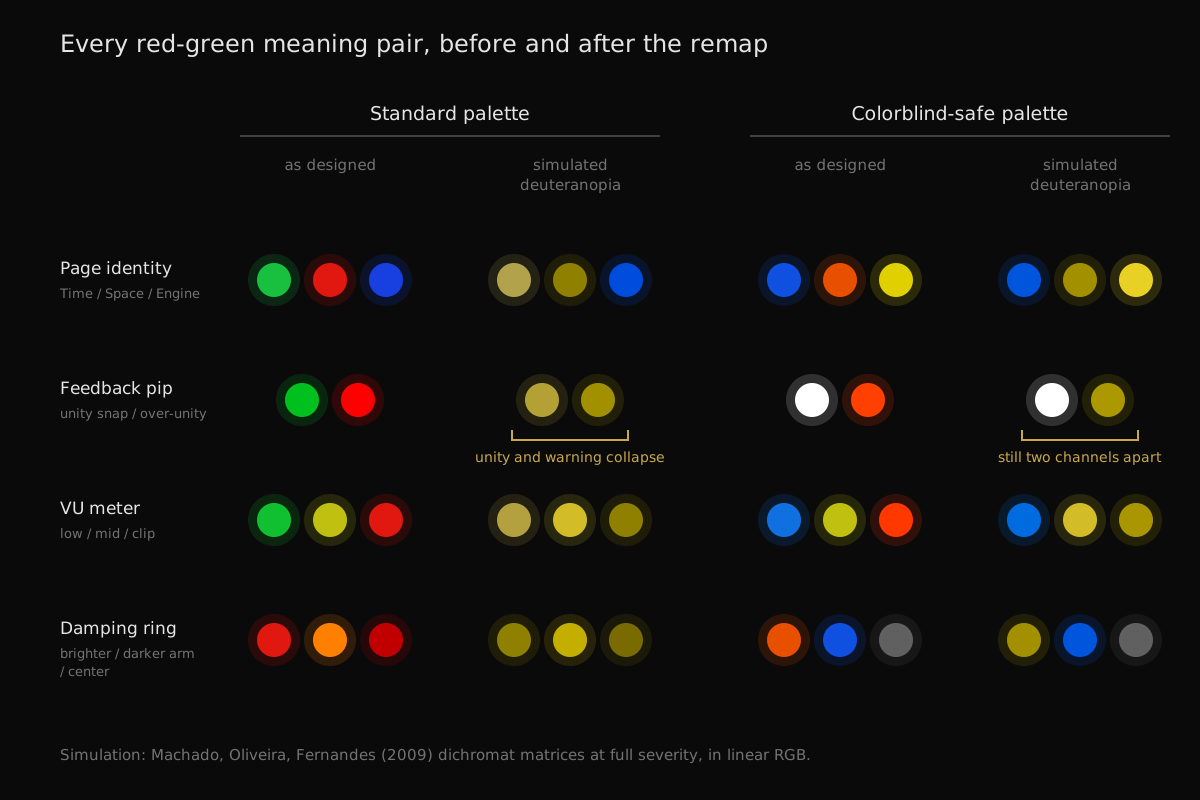
Running the stock palette through the standard Machado dichromat simulation: the unity-snap green #00C020 lands on #B3A136, and the over-unity warning red #FF0000 lands on #A39000. Two states whose entire job is to be opposites render as nearly the same ochre. The page colors fail the same way: the Time page's green and the Space page's red both simulate to ochre, and only the Engine page's blue survives as itself.
Remap
| Meaning pair | Standard | Colorblind-safe |
|---|---|---|
| Page identity (Time / Space / Engine) | green / red / blue | blue / orange / yellow |
| Feedback pip (unity / over-unity) | green / red | white / orange |
| VU zones (low / mid / clip) | green / yellow / red | blue / yellow / orange-red |
| Damping ring (brighter arm / darker arm / center) | red / orange / dim red | orange / blue / gray |
Blue against orange survives deuteranopia and protanopia because both conditions preserve the blue-yellow channel, which is exactly the channel the standard scheme barely used.
How the firmware switches palettes
Every color in Echoa's firmware lives in one struct so page_space stays correct whether it renders red or orange:
struct Palette
{
    /* Perf-page identity (page indicator + ring fills). */
    Rgb page_time;
    Rgb page_space;
    Rgb page_engine;

    /* Feedback pip: unity snap vs over-unity warning. */
    Rgb fb_unity;
    Rgb fb_over;

    /* VU meter zones. */
    Rgb vu_lo;
    Rgb vu_mid;
    Rgb vu_hi;

    /* ...15 more semantic slots... */
};

constexpr Palette kStandardPalette   = { /* the original scheme  */ };
constexpr Palette kColorblindPalette = { /* deutan/protan-safe   */ };

/** Active palette: read per frame, never cached across frames. */
const Palette& P();
Colors reach the LEDs three ways, and a palette change has to service all of them. Call sites that read P().vu_hi every frame follow automatically. Selector zone tables that were handed to the SDK as pointers are mutable arrays, refilled in place. Styles that copied a color at configuration time are re-issued. This isn't ideal, but it was an easy rip and replace:
void ApplyPalette(uint8_t idx)
{
    LedAnim::SetPalette(idx);
    const LedAnim::Palette& C = LedAnim::P();

    /* Pointer-retained zone tables: refill in place. */
    RefreshSettingsSelectorPalettes();
    EchoaUi::Knobs::ReapplyPalette();

    /* Value-copied styles: re-issue. */
    handles.gain_l.Color(C.set_accent);
    handles.gain_r.Color(C.set_accent);
    /* ...and the rest of the copied handles... */
}
This enables a simple UX: turn knob 6 on the Settings Global page and the next frame renders in the other scheme, no reboot. Or select it when plugged into the browser-based editor and settings manager. The choice saves with presets like everything else.
What the SDK gives you
Most of the plumbing above came from the Alchemy SDK. The selector itself is one declaration against the settings surface:
handles.palette = settings.Page(1).Pot(kGlobalPotPalette)
                          .Selector(kNumPalettes)
                          .Colors(kPalettePreview)
                          .InactiveDim(0.10f).Default(0);
db.SettingsField(kSettingsPageGlobal, kGlobalPotPalette,
                 "global.palette", "LED Palette",
                 "{\"kind\":\"enum\",\"labels\":[\"Standard\",\"Colorblind\"]}");
The deeper reason the feature was cheap is the ring animation system. Everything Echoa draws, cursors, comets, VU zones, warning pips, is a parameterization of two overlay primitives over a base fill. There are no hand-drawn frames anywhere in the firmware, which means there is no animation with a color baked into it. Retinting the entire instrument really is 23 table entries, and authoring the second palette was a design problem (pick values, simulate, iterate) rather than an engineering one. A third palette would be a 23-line diff. We love that.
If you are building your own firmware on the platform, you inherit this structure by default: keep your colors in one semantic table and read it through an accessor. There's no need to provide an explicit palette function in the SDK.
Where the rest of hardware is
Video games normalized colorblind modes over a decade ago; or they simply design core elements around it. Music hardware has not followed. Accessibility work in music tech exists, but it has concentrated on screen-reader support in software, and color has been left alone even though LED-dense panels are the worst case for it. If you know other Eurorack modules with colorblind accessible settings, let me know and I'll add them here for some accolades.
Not finished
Tritanopia, the rare blue-yellow deficiency, is not specifically served, and the blue-orange axis this palette leans on is the axis tritanopes lose. The brightness separations were tuned by simulation and by my own eyes, and brightness perception varies between people. If you have color vision deficiency and an Echoa, I want your feedback: luke@hermeticmodular.com, or the Hermetic Modular Discord.
The palette shipped in v1.1.0 on July 17. The Echoa release notes cover the rest of the release, and the web programmer will update a connected module from the browser.
FAQ
How do I turn on the colorblind palette on Echoa?
Hold the two lower buttons for about two seconds to enter Settings, step to the Global page with the top button, and turn knob 6. The switch is instant, needs no reboot, and saves with your presets. It is also available as LED Palette in the web editor.
Does the colorblind palette change the sound?
Of course not you dingus.
Will other Alchemy Lab firmwares get the colorblind palette?
That is the plan, when needed. Spagyros articulates far less rich state via color than Echoa, but it could be improved.
Does the palette cost any performance?
No. Colors come out of a lookup table during panel rendering, the render path is unchanged, and the switch itself is one byte of state plus re-issuing styles.